Product
Find the likely hiring manager and their work email
Warmada is a hiring manager research and outreach tool for job seekers. Start with a job posting in Chrome, review the suggested contact, and decide whether to send a personal note from your connected Gmail.
Start with the job, then identify a person
Knowing a company’s name is not the same as knowing who is hiring for a specific role. A company can have several teams recruiting people with the same title. Warmada uses the posting and company context to look for a relevant hiring contact before preparing outreach.
The result is a likely contact, not a confirmed owner of the vacancy. Check their role, team, and company before sending. If the evidence points to a different department or leaves several plausible people, do more research instead of treating a name as a certainty.
How to use the hiring manager email finder
- Sign in to Warmada and open a supported job posting with the Chrome extension.
- Start the lookup using the role and company information on the page.
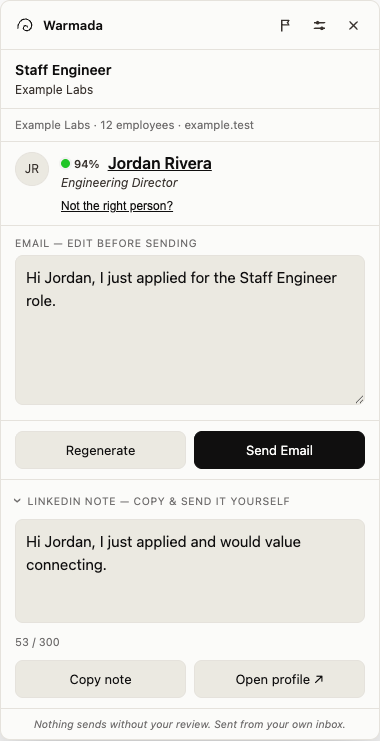
- Review the suggested contact and any available work email. Check that the person makes sense for this role.
- Read the draft, add a specific example from your experience, and verify the recipient.
- Send through your connected Gmail only when you approve the message.
Contact research and a draft in the same workflow
Keep identification and email availability separate in your decision. An available address does not prove that the person manages the vacancy. Likewise, a plausible hiring manager may have no available work email.
| Part of the workflow | What you review |
|---|---|
| Hiring contact | A suggested person based on the role and company context |
| Work email | An available address, when lookup succeeds |
| Outreach draft | A message grounded in the job context that you can edit |
| Sending | Your approval and connected Gmail account |
Which job pages can I use?
Warmada has dedicated extraction for Greenhouse, Ashby, and LinkedIn, plus generic job-page detection tested against Lever, Workday, and SmartRecruiters. Page layouts can change and support varies by posting. Use an individual vacancy rather than a company’s job-listing index.
A supported page means Warmada can attempt the workflow. It does not mean every role will produce a suitable person or a usable email address.
What if no contact or email is found?
Contact information can be missing, ambiguous, or out of date. Review the lookup result and keep the application moving through the employer’s stated process. A recruiter named in the posting or an existing connection may be a more appropriate next step.
Warmada does not guarantee a reply, an interview, or an existing relationship with the recipient. Respect instructions in the posting and avoid sending to several guessed addresses.