Product
Draft a personalized job outreach email from a job posting
Warmada helps job seekers turn a real job posting into an outreach draft. Review the proposed recipient, add evidence from your experience, and send the message from your connected Gmail after you approve it.
Give the message a reason to exist
A useful outreach email connects a requirement in the job posting to something you have actually done. The job title, team, and company context give the draft a starting point; your review supplies the judgment about what is relevant and true.
Before sending, replace generic enthusiasm with a concrete example. If the role involves simplifying onboarding, explain which onboarding problem you worked on. Keep the description proportionate to your contribution and do not add an outcome you cannot support.
What to check in every AI-assisted draft
- Recipient: does this person plausibly work with the team hiring for this vacancy?
- Role: are the title, location, and requisition details accurate?
- Experience: can you substantiate every claim about your work?
- Tone: does the message sound like something you would say?
- Ask: is there one clear, reasonable next step?
- Sending: is this the right channel, and does the posting permit direct contact?
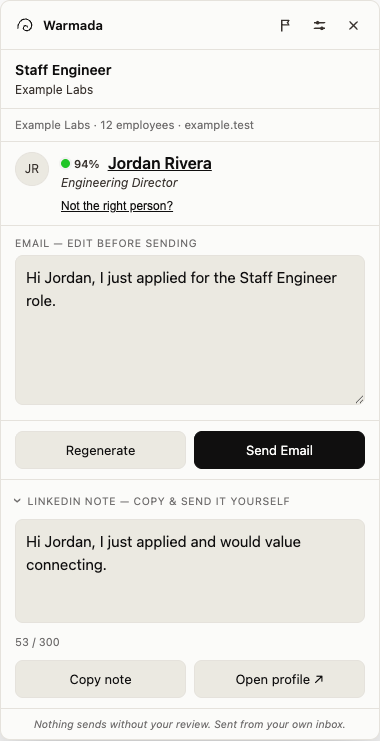
A short job outreach email you can adapt
This fictional example illustrates a structure, not a tested response-rate formula. Replace the role and experience with your own, and only say you applied if you have submitted the application.
Does the email writer send messages automatically?
Sending requires your approval. Warmada prepares a draft for review and sends an approved email through your connected Gmail. Editing the draft is part of the workflow, not an optional check after an email has already gone out.
If a suitable contact or work email is unavailable, the draft does not solve that missing information. Verify the recipient or use the employer’s application channel before taking the next step.
First outreach, follow-up, or referral request?
Use first outreach to introduce yourself around a specific role. Use a follow-up to continue an earlier message or ask about an application after the employer’s stated timeline. Ask for a referral when you have an appropriate connection and can explain why the role fits.
A cold message should not imply that someone introduced you. Naming an existing relationship that does not exist makes a polished draft less trustworthy, not more personal.